
Textures
Texture assets are used for 3D models, block materials, particle effects, and planet surfaces.
| Property | Value |
|---|---|
| Folder location | mods/{my_mod_name}/textures |
| Supports subfolders? | Yes |
| File formats | ktx2 |
| Naming convention | Strict |
Texture Types
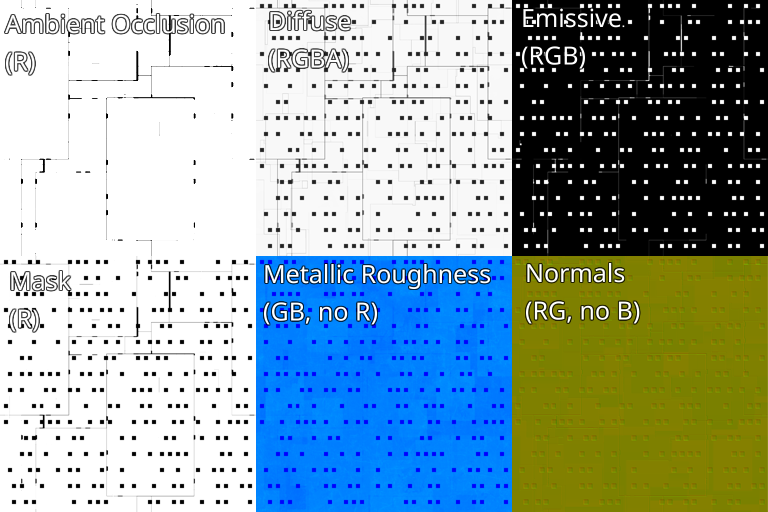
Each texture has a specific use case. It can be a diffuse map (also known as: base color, albedo), its can be a normal map, etc. Also, it can be a "generic" type. The type of the texture also depends where it is used.
DANGER
The texture filename must have a specific suffix, otherwise it will be treated as a generic texture, which may cause artifacts (or a game startup error), when used incorrectly.
When a texture load fails, it will print exactly why in the game log file.
Refer to the table below which specifies what type of texture can be used, the color component target type (RG vs RGB for example), and so on.
| Usage type | Target type (--target_type) | Filename suffix |
|---|---|---|
| Base color (albedo) | RGBA | _diff or _biome |
| Emissive color | RGB | _emis |
| Metallic roughness | RGB or GB | _meta |
| Ambient occlusion | R | _ao |
| Mask (color mask) | R | _mask |
| Normals | RG with --normal_mode flag | _norm |
| Generic | Any | No suffix |
And refer to the following table below to understand where they can be used:
| Usage type | Used by models | Used by blocks | Used by planets |
|---|---|---|---|
| Base color (albedo) | Yes | Yes | Yes (_biome) |
| Emissive color | Yes | Yes | No |
| Metallic roughness | Yes | Yes | No |
| Ambient occlusion | Yes | Yes | No |
| Mask (color mask) | No | Yes | No |
| Normals | Yes | Yes | No |
| Generic | No | No | No |
INFO
Generic textures are usually used for visual effects and have hard-coded names (they can not be changed). For example, specifying the temperature color of the sun.
DANGER
The same texture between models can be re-used, and also between blocks, but the texture can not be shared between models and blocks at the same time!
Diffuse texture
The diffuse texture specifies the base color of the model or block. It supports alpha transparency, in which case the transparent pixels are treated as not rendered. The transparency is either yes or no. If you have a transparency gradient, then any pixels below 50% transparency will actually render as transparent.
The color of the diffuse texture can be adjusted in the model's GLTF file or in the block's specification file.
Emissive texture
The emissive texture specifies how should the model (or block) glow. Transparency is ignored and the ktx2 file should not have it.
Metallic-Roughness texture
The metallic-roughness is a single texture that specifies both how metallic the object is, and also how rough the object is.
Color channels:
- Red -> Unused
- Green -> Roughness
- Blue -> Metallic
Refer to these resources for more information:
Ambient occlusion texture
The ambient occlusion, or AO for short, specifies extra "darkness" (or shadows) on the surface.
More white -> less darkness, more dark -> more darkness.
The ktx2 file should be encoded with --target_type R because only the red color channel is used.
Mask texture
The mask texture is used only by blocks. They specify how should the block's surface be colored. Dark areas specify where no coloring should apply. Gradient white to black can be used.
Math formula that is applied during the rendering, where palette_color is the color as shown in the color palette in the ship editor UI, and the mask_color is from this mask texture.
text
result_diffuse = mix(base_color, base_color * palette_color, mask_color);Normals texture
The normal map specifies, per pixel, details on the surface. See [Normal mapping on Wikipedia] (https://en.wikipedia.org/wiki/Normal_mapping) for more info.
Each normal map's pixel specifies a unit 3D vector of the surface. The vector always should have a length of 1.0
KTX2 file format
The ktx2 is the only supported file format for textures in the game. To be more specific, the version 2 format, with Basis Universal UASTC compression, and ZSTD supercompression. This is a universal format that is transcoded to the specific pixel format that the GPU supports. The transcoding happens when the game starts. This allows the game to have very tiny assets. You can compress an RGBA 1024x1024 texture into only few KiB.
Moreover, the ktx2 format also allows to hold mipmaps.
What are the rules?
- Use UASTC compression. Anything else is rejected.
- Use KTX2 file format (not v1.0). This is enabled by default whenever you choose UASTC compression.
- The file name must end as
.ktx2. - Use image sizes with power of 2 sizes (64x64, 128x128, 256x256, etc.)
- Use ZSTD supercompression. Do not compress it with an external program. The ZSTD compression is done within the ktx2 file by the ktx2 tools!
Compressing to KTX2
To compress a texture into KTX2 format, use the following command line:
bash
toktx --encode uastc --uastc_rdo_l 1.0 --zcmp 5 --uastc_quality 2 \
    --genmipmap --assign_oetf linear \
    --target_type RGBA output_file_name.ktx2 input_file_name.png
You can use this command to compress any texture, but you must choose the correct target type! Please see the target type and file name suffix specification in the next section.
You can download the executables from the KTX-Software GitHub's release page: https://github.com/KhronosGroup/KTX-Software/releases
Command explanation:
--encode uastc-> Compress with UASTC--uastc_rdo_l 1.0-> Enable post-processing and sets quality. Lower values yield higher quality/larger compressed files. A good range to try is [.25,10]. For normal maps a good range is [.25,.75]. The full range is [.001,10.0]. Default is 1.0.--zcmp 5-> ZSTD supercompression level. The range is 1 - 22 and the default is 3. Lower values=faster but give less compression--uastc_quality 2-> This optional parameter selects a speed vs quality tradeoff. Range is 0 to 4. Lower value is faster but lower quality.--genmipmap-> Generates mipmaps. Strictly required for all textures!--assign_oetf linear-> Linear gamma colors.--target_type RGBA-> Specifies that the output image is going to be RGBA. For normal maps this must be onlyRG.
Optionally:
--normal_mode-> Specifies that the output is a normal map. Without this the normal maps will have artifacts.
Target type and naming convention
The target type depends on the usage of the texture. Use the table from the previous section to figure out the command argument value.
Print ktx2 file info
You can use the following command to print the ktx2 file info:
bash
ktxinfo my_ktx_texture_diff.ktx2Convert from ktx2 to png
You can use the following command to convert back from ktx2 into a png file. This will lose mipmaps and quality.
bash
ktx extract --level 0 input_file.ktx2 output_file.pngThe --level 0 specifies which mipmap level you are exporting.
WARNING
Do not convert back to png, and then again to ktx2, and then back, and again. You will progressively lose quality.
Always keep the original texture, in whatever format you desire, as a backup somewhere. Always export from the original to ktx2 in order to add it to the game.
More resources
- KTX tools reference: https://github.khronos.org/KTX-Software/ktxtools/index.html
- KTX file format specification: https://github.khronos.org/KTX-Specification/ktxspec.v2.html
- KTX tools download: https://github.com/KhronosGroup/KTX-Software/releases